Harbourline University · Admissions
Whose turn is it? The question the spreadsheet could not answer
Chasing people who had been made an offer and gone quiet was run from a spreadsheet, a notebook of call attempts, and an approval chain the tooling knew nothing about. Cases stalled for weeks because nobody could see they were waiting on them.
Overview
- Product
- Follow-up work queue, dialler and three-role case workflow
- My role
- Product design, UI, workflow and role design, coded prototype
- Team
- Me as the product designer, with product management and back-end development
- Tools
- Figma; coded prototype in Vue 3 and Vite
The problem
The list of people who had not responded lived in a spreadsheet. The calls were logged in a notebook. And the decision to let an offer lapse or withdraw it needed a team lead, sometimes a manager - none of which the tooling represented.
The result was a specific and very common failure: work stalled silently. A case sat waiting on an approval nobody knew was theirs, and it surfaced weeks later when someone went looking. Nobody was at fault, which is exactly why it kept happening.
There was a second, quieter problem. Officers wrote the comment that justified each step, and writing it well took time they did not have - so comments were thin, which made the next person in the chain slower.
Users & personas
I make calls all day. I should not have to remember who I have already called.
Alex Whitlam
Officer
- Goals
- Work a queue without losing his place
- Log a call attempt as it happens, not afterwards
- Hand a case up with enough context that it comes back approved
- Frustrations
- Re-sorting a spreadsheet to find where he was
- Writing the same justification comment from scratch
- Not knowing whether a case he escalated moved
I will sign it off. I am not going to reconstruct it first.
Marcus Deng
Manager
- Goals
- Approve or reject with the full history in front of him
- See how much is waiting on him right now
- Keep the team inside the service timeframes
- Frustrations
- Approvals that arrive as a one-line message
- Discovering a backlog that built up quietly
- Having no record of why a previous call was made
Process
I designed the roles explicitly rather than as permissions. Officer, team lead and manager see the same case with different actions available, and moving a case towards lapsing or withdrawing is a handover someone has to accept. Making the handover an object in the system - rather than a convention people followed - is what removed the silent stall.
The queue came next. Officers work in long sittings, so it needed filters, configurable columns and a stable sort that survives coming back to it. A call toggle logs attempts as they happen, because anything logged afterwards is logged badly or not at all.
The smart suggestion addressed the thin-comment problem. It drafts the comment that would accompany the next step, and the officer edits or discards it. I was strict about one thing: it never advances the case itself. A system that both drafts the justification and takes the action has quietly made the decision.
That line - draft, never act - came from testing. When an early version offered a one-click "accept and proceed", officers used it without reading, which produced exactly the thin justification the feature was meant to fix. Splitting the draft from the action was the fix.
Key design decisions
A queue built for a long sitting
Filterable, with configurable columns and a sort that holds, so an officer can leave and come back without losing their place.
A dialler that logs as you go
A call toggle records attempts at the moment they happen, so the history is accurate rather than reconstructed at the end of the day.
A case that knows whose turn it is
Each case page shows its stage, its full history and only the actions the current role can take. Escalation is a handover someone accepts, not a convention.
A suggestion, not an action
A smart suggestion drafts the comment for the next step. The officer edits or discards it. Nothing in the system takes the step on their behalf.
Screens
 Open full size
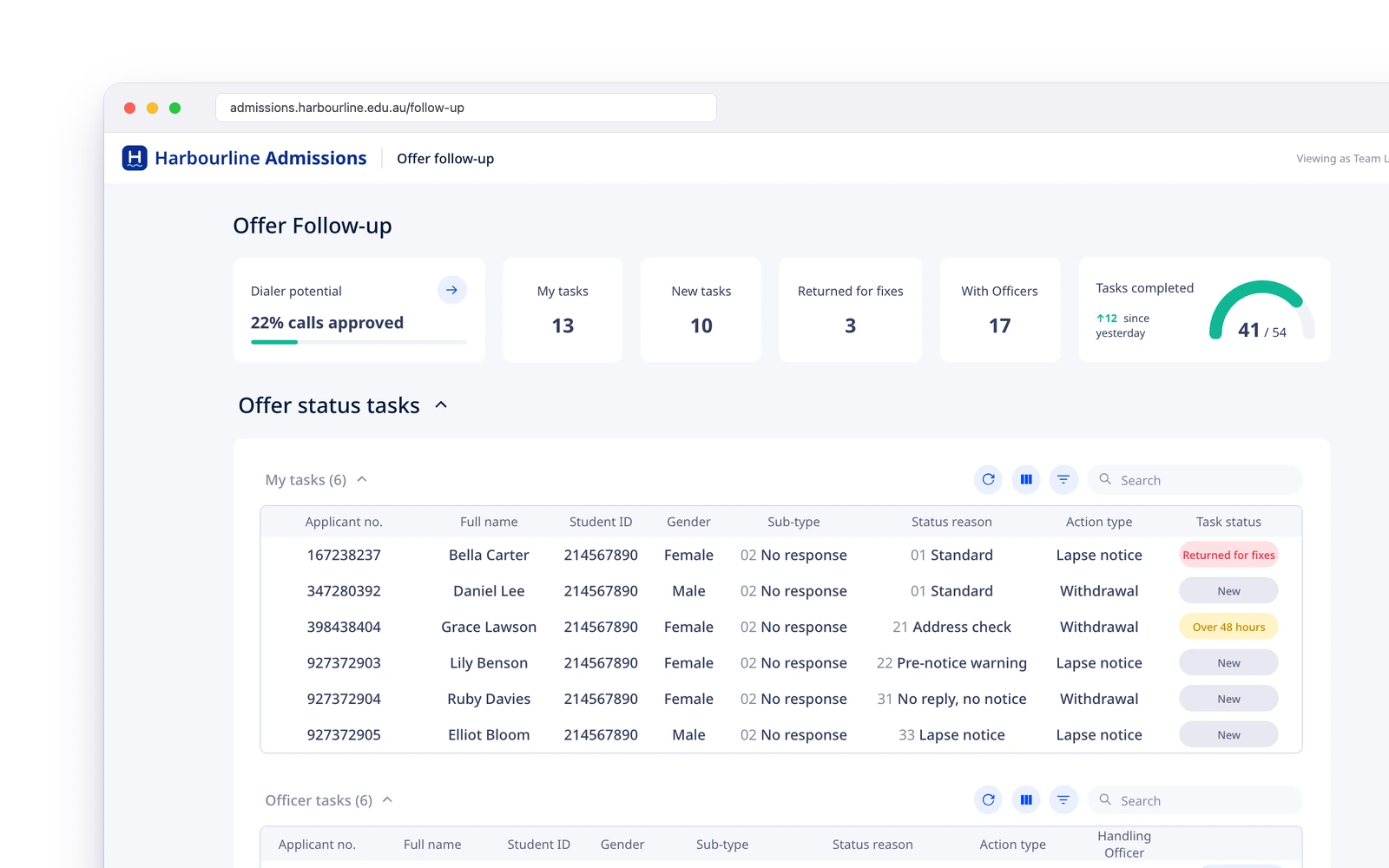
The offer follow-up queue: workload counters across the top, then My tasks and Officer tasks with status reason and action type on every row
 Open full size
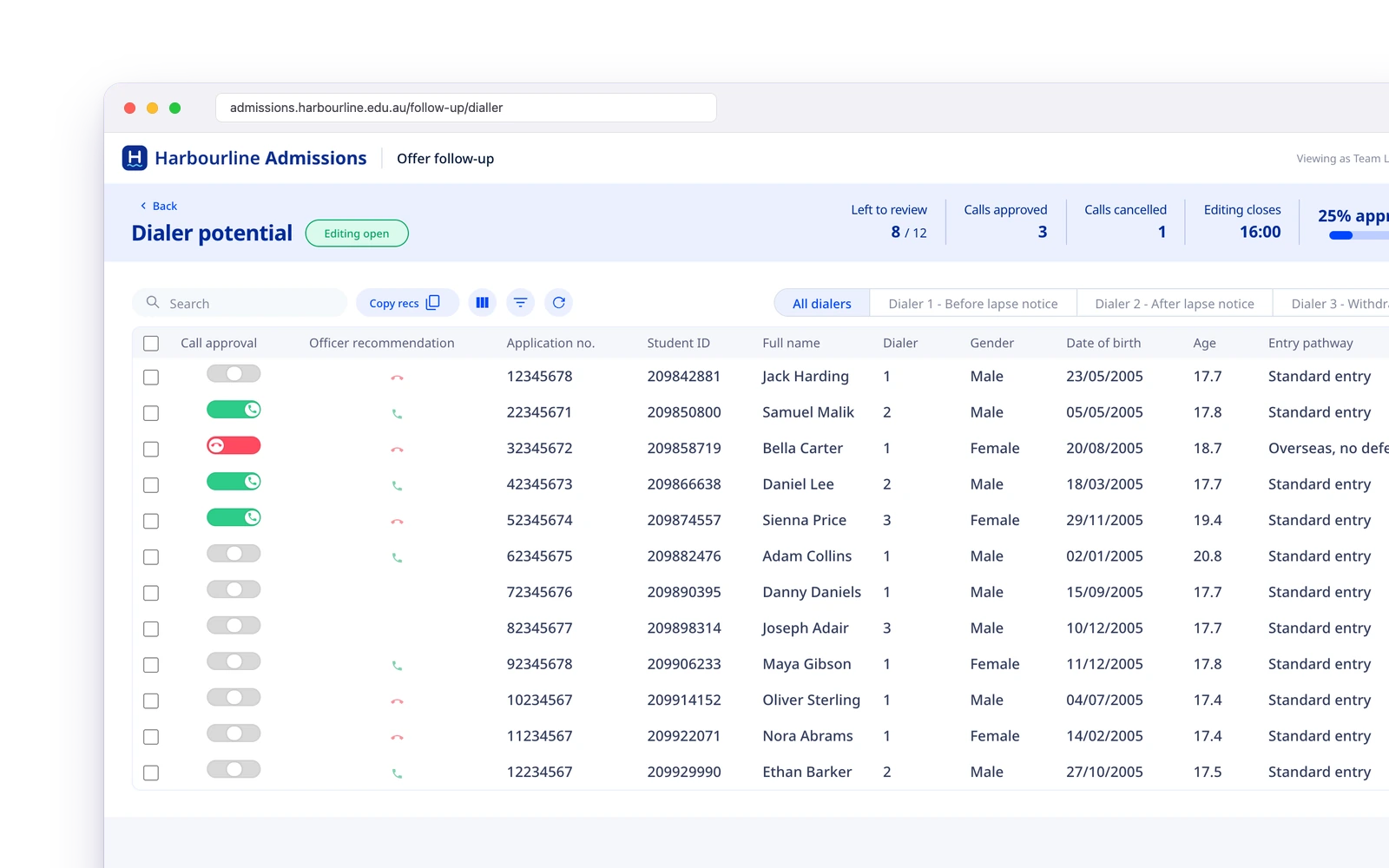
The dialler queue: counters for what is left to review and when editing closes, filters by dialler stage, and a call toggle on every row.
 Open full size
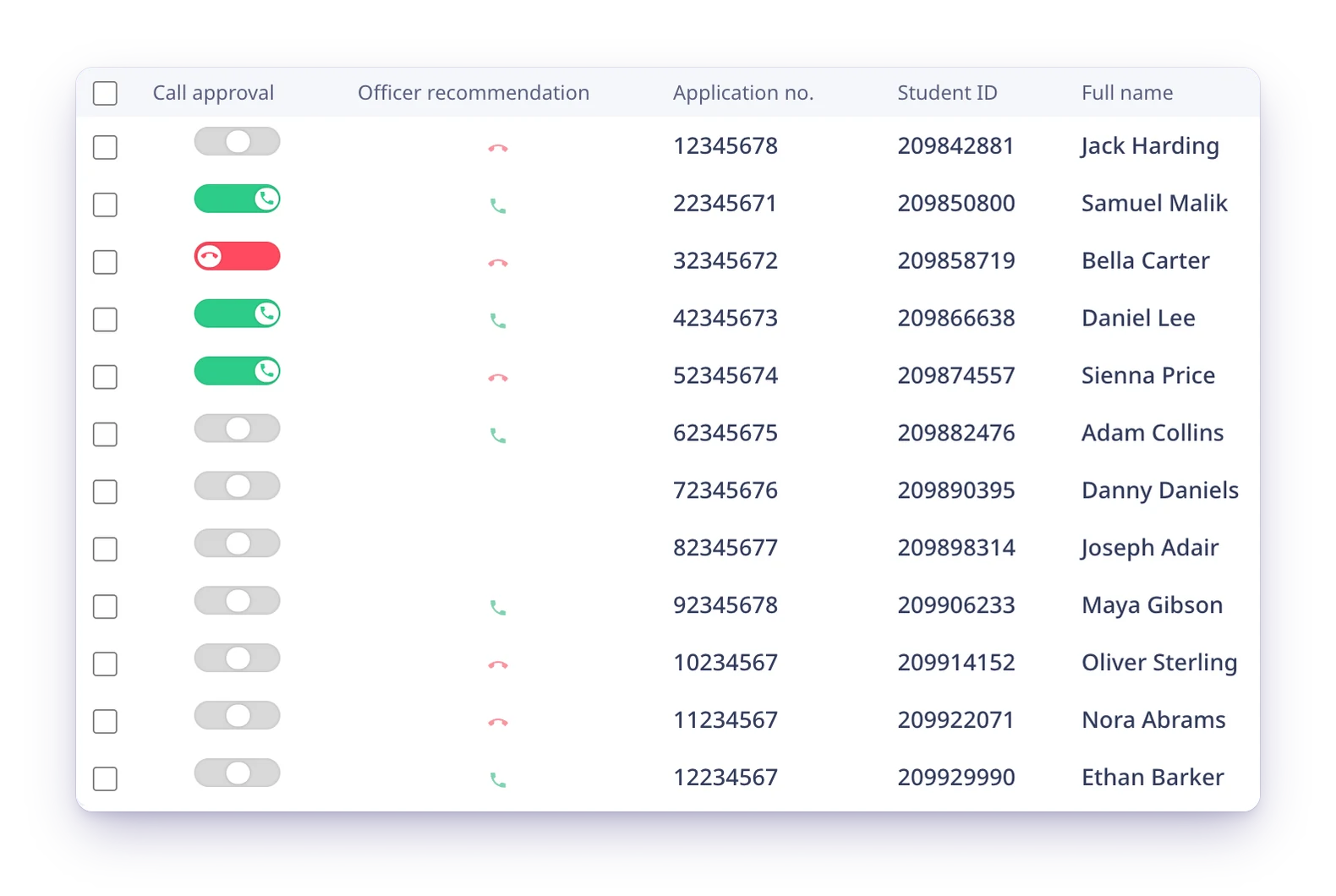
Call approval toggles beside the officer's recommendation, so each decision is logged on the row at the moment it is made.
 Open full size
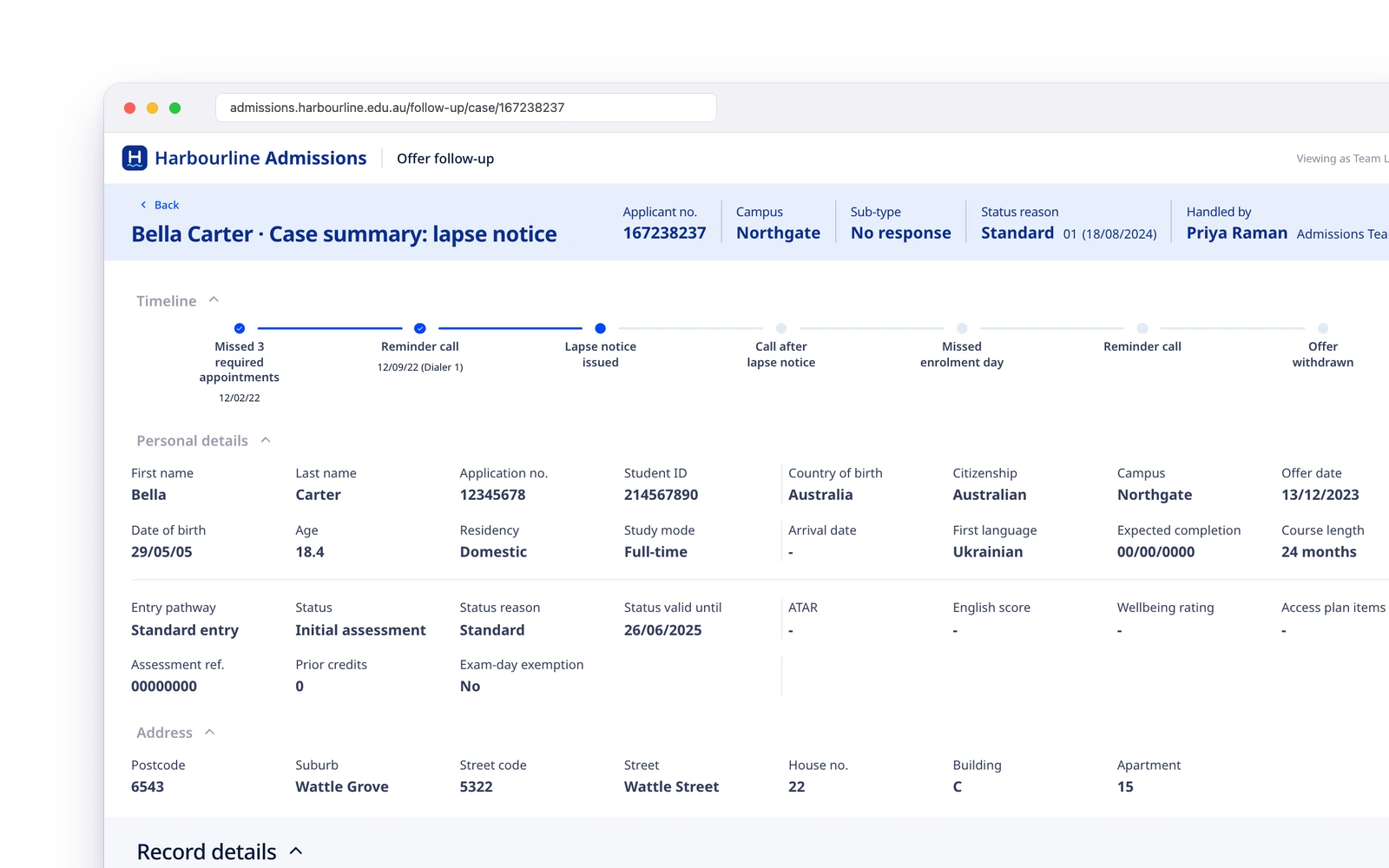
A case page: who is handling it, where it sits in the lapse process timeline, and the applicant's details underneath.
 Open full size
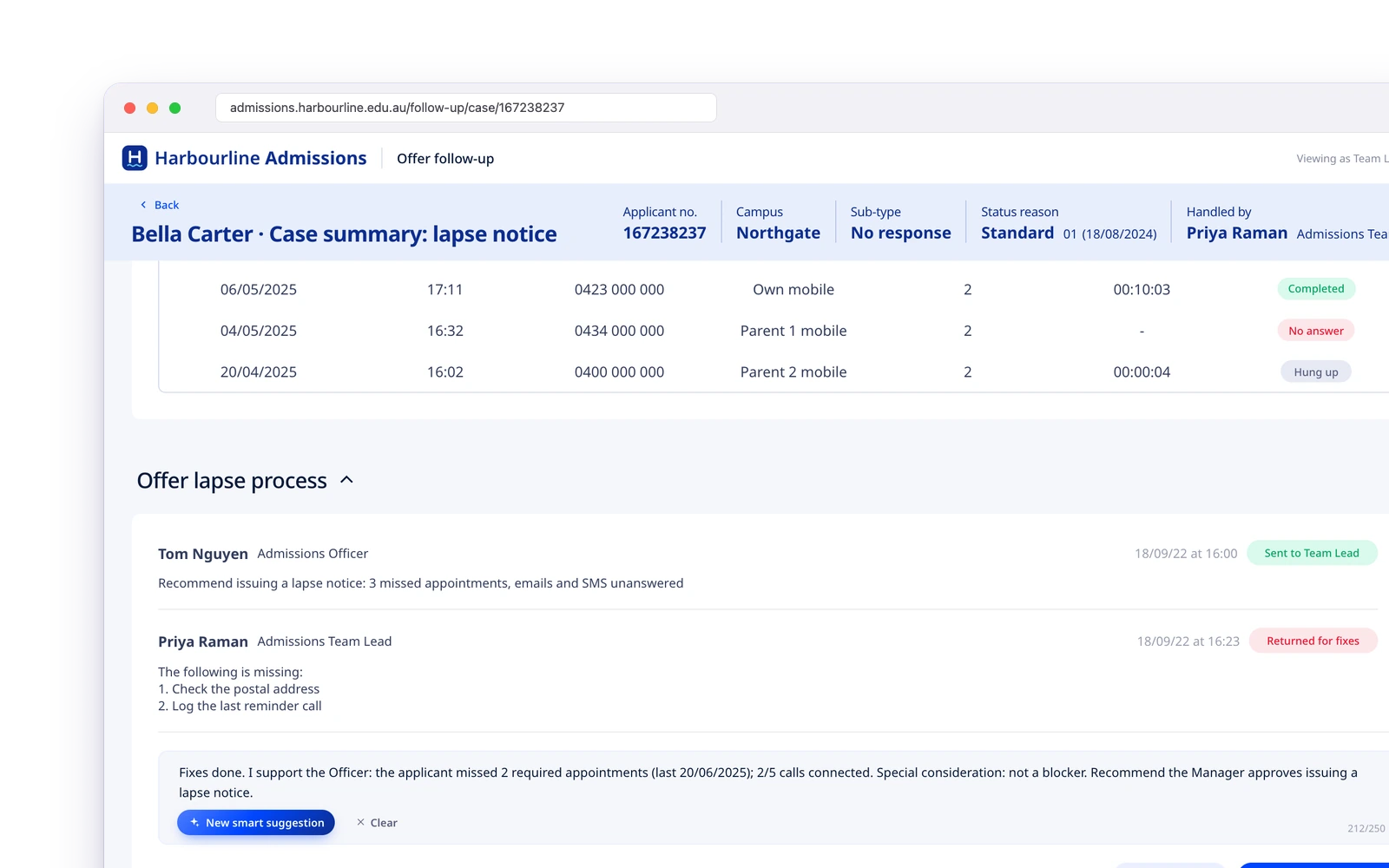
The handover history on a case, with a smart suggestion drafting the Team Lead's comment; it stays editable, and nothing moves until they choose an action.
 Open full size
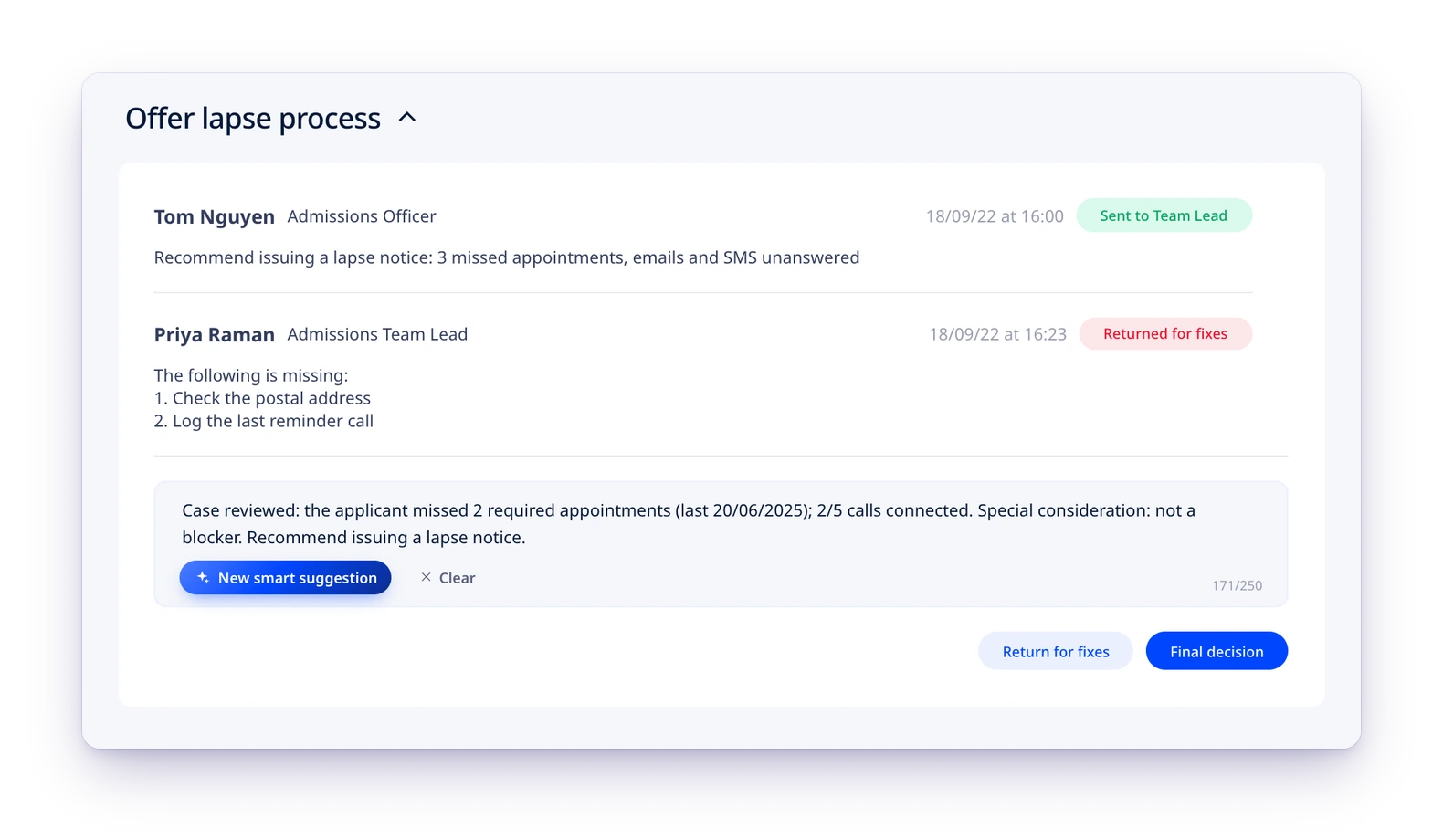
The same case viewed as the Manager: the suggestion drafts the Manager's review of the case, and the action becomes Final decision.
Impact
Making the handover visible removed the category of problem where work stalled because nobody knew it was theirs. A case now says whose turn it is, and a manager can see how much is waiting on them without asking.
The draft-never-act rule is the finding I would most want to carry into another team. The convenient version of the feature - one click to accept and proceed - tested worse than the inconvenient one, because convenience is what let people skip the thinking the step existed to capture.
Comments got longer and more specific once there was a draft to argue with. Giving someone something to edit turns out to be a much better prompt than giving them an empty box.
Got something like this to untangle?
Start a project