Harbourline University · Admissions
Rules you can read before you save them
The rules that decided who got an offer - intake targets, which courses group together, what results and prerequisites each demands - lived in a policy document that was revised only occasionally and applied from memory in between. This is the wizard that replaced it.
Overview
- Product
- Rule-authoring wizard: targets, groups and eligibility conditions
- My role
- Product design, UI, interaction design, coded prototype
- Team
- Me as the product designer, with product management, back-end development and policy staff as reference users
- Tools
- Figma; coded prototype in Vue 3 and Vite
The problem
A policy document set the intake targets for each faculty, defined which courses were considered together, and specified the results, prerequisites and subject requirements each course demanded. It was authoritative, it was revised only occasionally, and between revisions it was applied by people remembering it.
Two failure modes followed. Rules drifted - two officers applied the same clause differently - and rules could not be changed mid-year without a document revision nobody had the appetite for, so exceptions were handled informally instead.
The design difficulty was that targets, course groups and eligibility conditions are three genuinely different shapes of data, and all three feel like "rules" to the person entering them. A single form would have conflated them; three unconnected screens would have hidden that one depends on the next.
Users & personas
I need to know what this rule will do before it does it to every applicant it covers.
Elena Vasquez
Policy Manager
- Goals
- Change a rule mid-year without a document revision
- See the whole rule before saving it
- Keep a history of what changed and when
- Frustrations
- Writing rules in prose and hoping they are read the same way
- Finding out a clause was interpreted two ways
- Having no safe way to try a change
My faculty is not the same as the one next door. The rules should know that.
Daniel Okonkwo
Faculty Admissions Manager
- Goals
- Set targets for his own faculty
- Group his courses the way applicants actually choose them
- Understand why someone was ruled ineligible
- Frustrations
- Central rules that do not fit his courses
- Being told a decision was "per policy" with no detail
- Waiting on the centre to make a small change
Process
I split the wizard into five steps along the real seams in the data - General settings, Course groups, Placement courses, Other confirmed and Summary - because that order is also the dependency order. You cannot write a sensible eligibility condition until you know which courses it applies across.
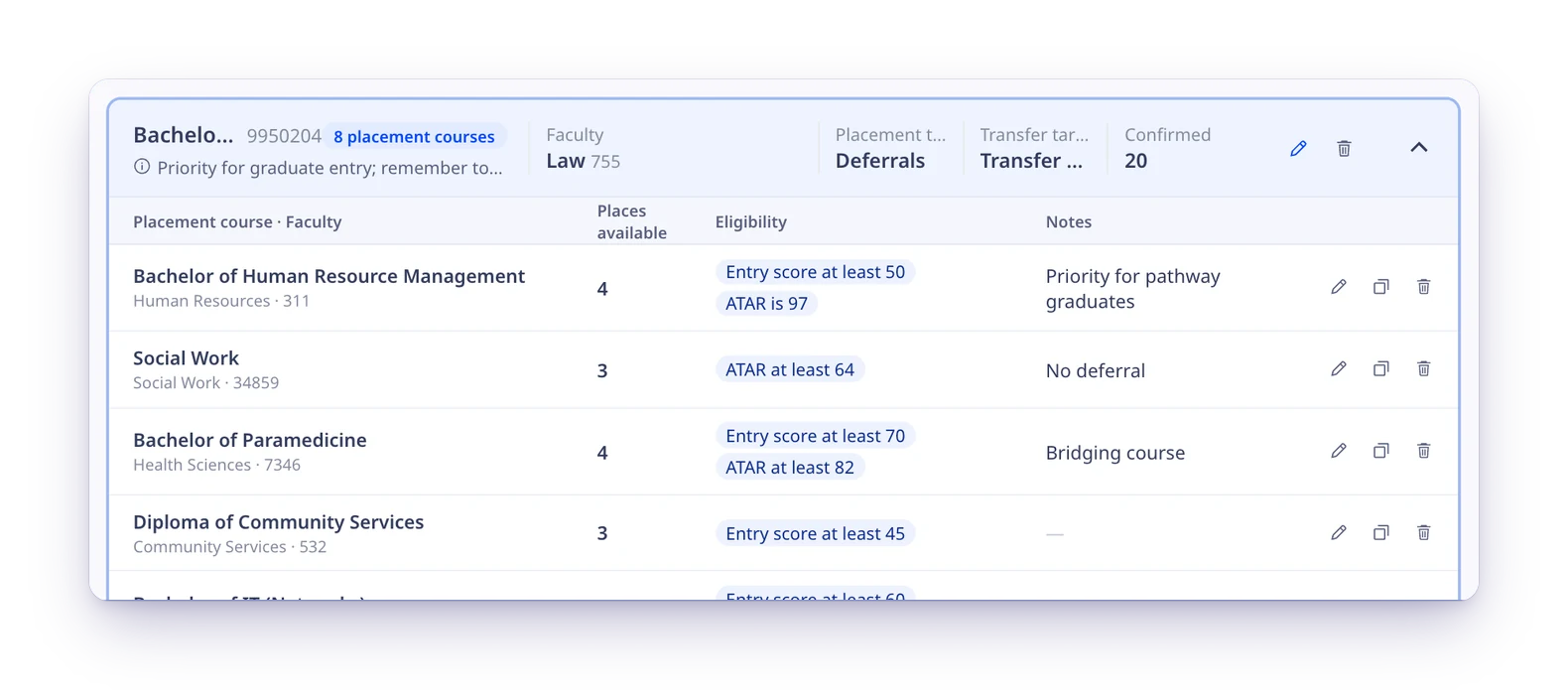
The decision that made it work was making the rule read back. Every eligibility condition is shown as a chip that reads like a sentence - "Entry score at least 50" - and the last step, Summary, lays out the whole rule, group by group and course by course, before it is saved. That turned the wizard from a form you fill into a statement you check.
I spent most of the time on the eligibility conditions inside the placement steps, which is where the real complexity sits: results thresholds, prerequisites and subject requirements combine, and the combinations are where misreadings happened. Each condition is built from a criterion, an operator and a value, joined explicitly, rather than written as free text, so an ambiguous rule is not expressible.
Date handling got its own attention. Rules apply from an anchor date and sometimes across ranges, and a rule with a quietly wrong start date is worse than no rule, so the date inputs show the period in words next to the fields.
Key design decisions
Five steps along the real seams
General settings, course groups, placement courses, other confirmed courses, then a summary - in dependency order, so each step has what it needs from the one before.
A rule you can read back
Eligibility conditions read back as plain-language chips, and a Summary step lays out the whole rule before it is saved, so the wizard is a statement you check rather than a form you fill.
Conditions as chips, not prose
Results thresholds, prerequisites and subject requirements are built from a criterion, an operator and a value and shown as chips, so an ambiguous rule cannot be expressed in the first place.
Dates you can read
Anchor dates and ranges show the resulting period in words beside the fields, because a rule with a quietly wrong start date is worse than no rule.
Status on every rule
Each rule carries a visible status, so a draft cannot be mistaken for one in force.
Screens
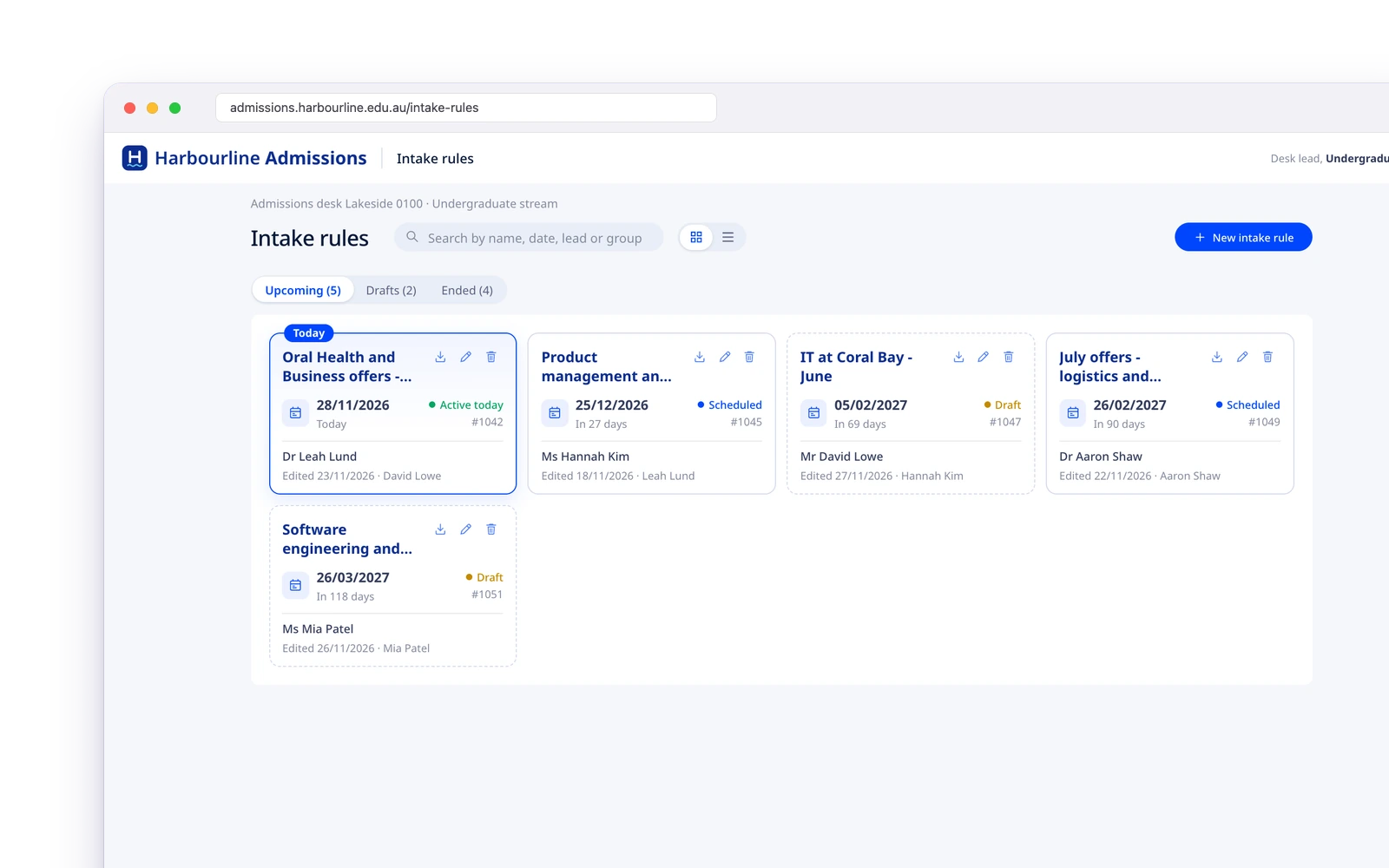 Open full size
The intake rules screen: upcoming rules as cards carrying their date, faculty, status and owner, with Drafts and Ended tabs beside them
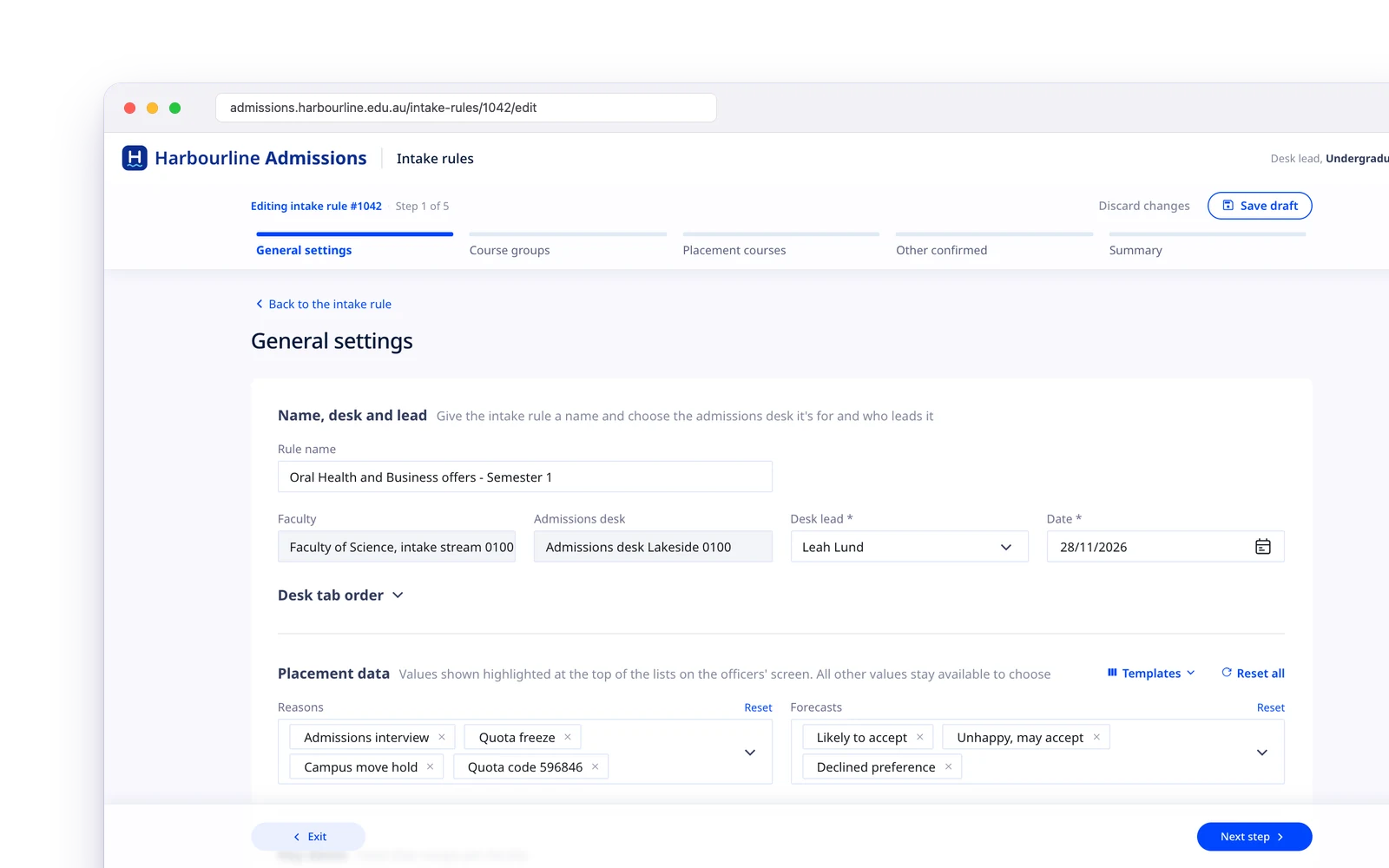 Open full size
Editing an intake rule, step one of five: name, faculty, desk, lead and date, then the reasons and forecasts it applies to as chips.
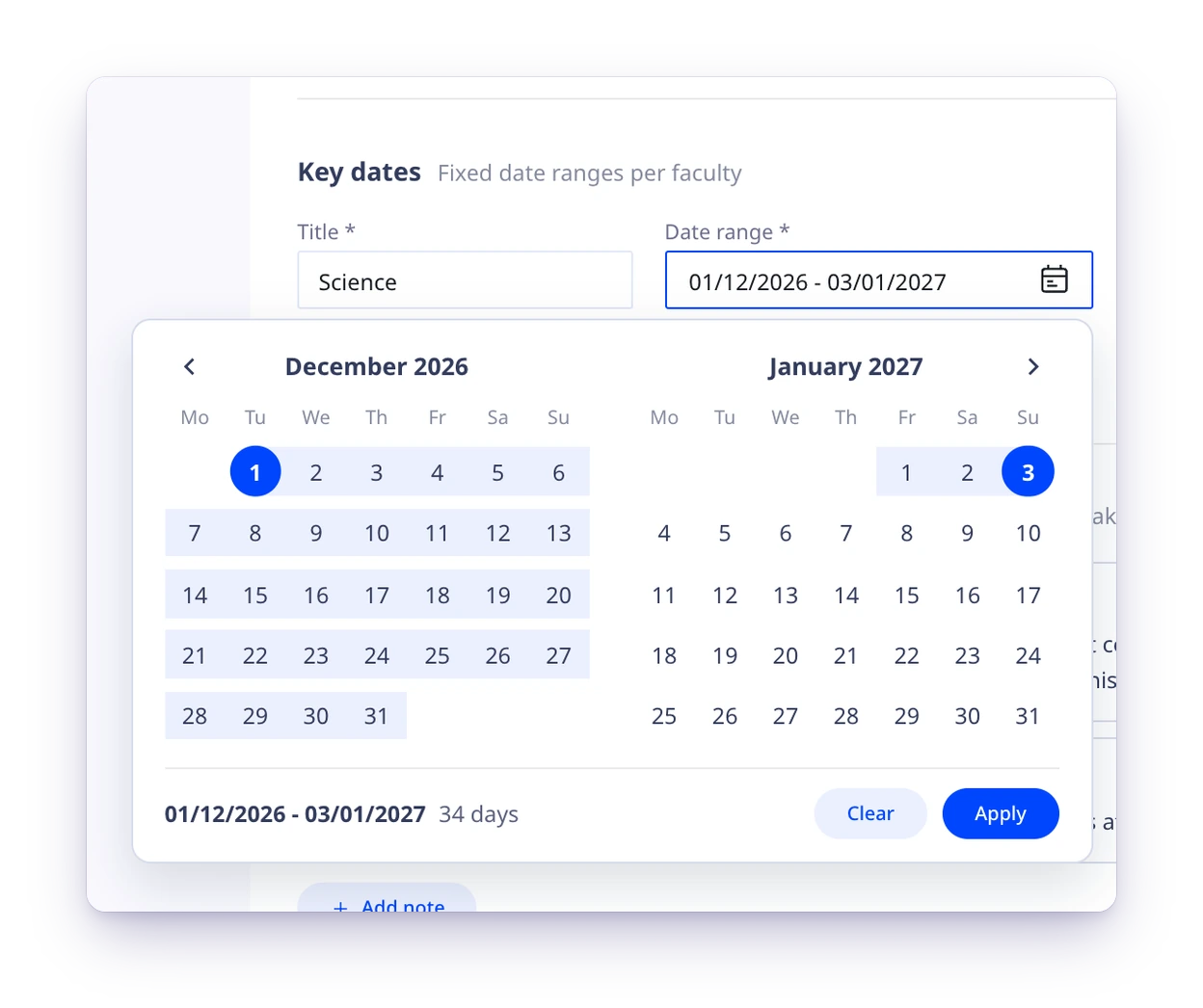 Open full size
Choosing a key date range, with the resulting period spelt out underneath (34 days), so a wrong start date is easy to spot.
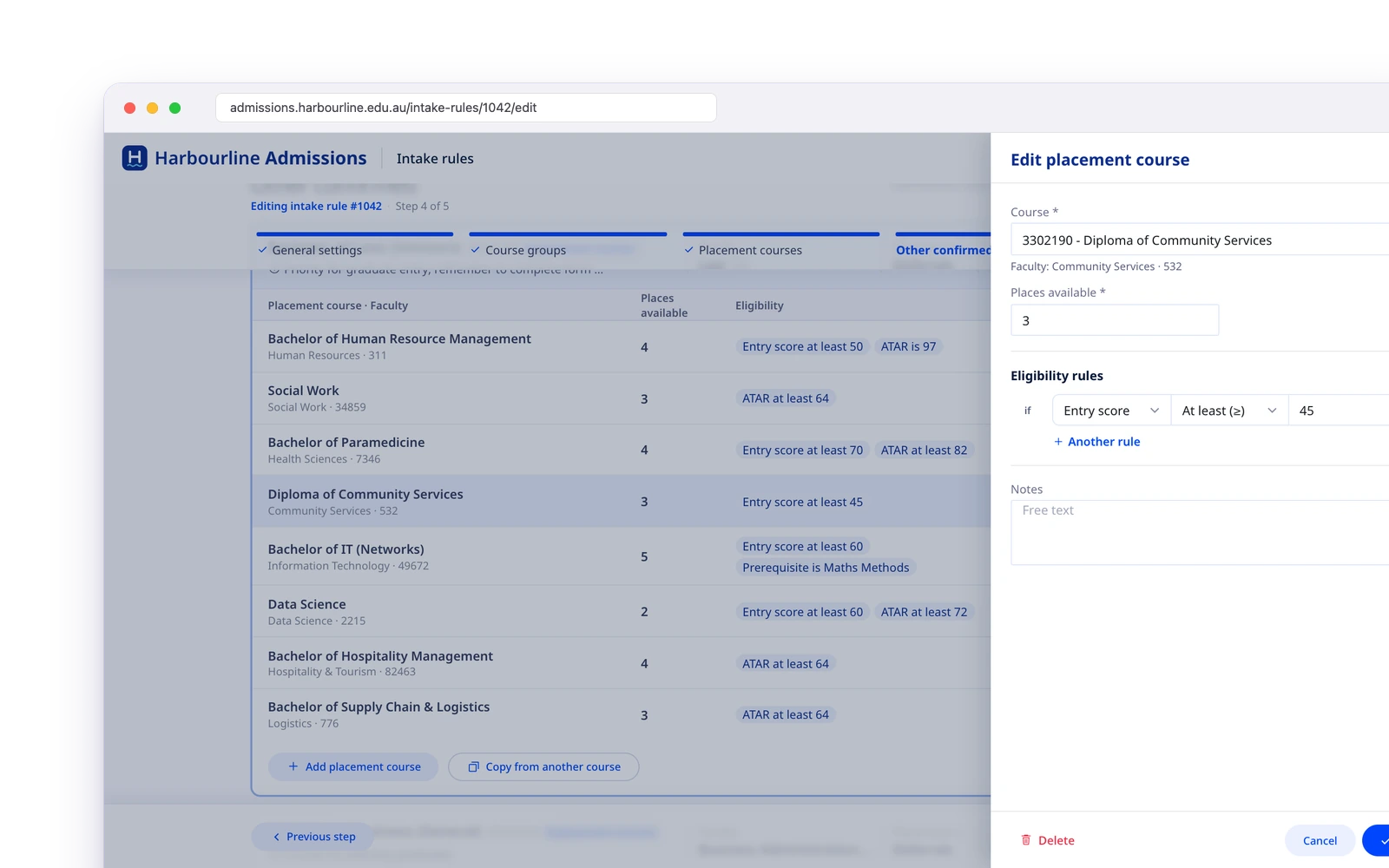 Open full size
Step four of the wizard: placement courses for a main course, each with its eligibility conditions, and one course open for editing.
 Open full size
Eligibility built from a criterion, an operator and a value, then shown back as plain-language chips such as "Entry score at least 50".
 Open full size
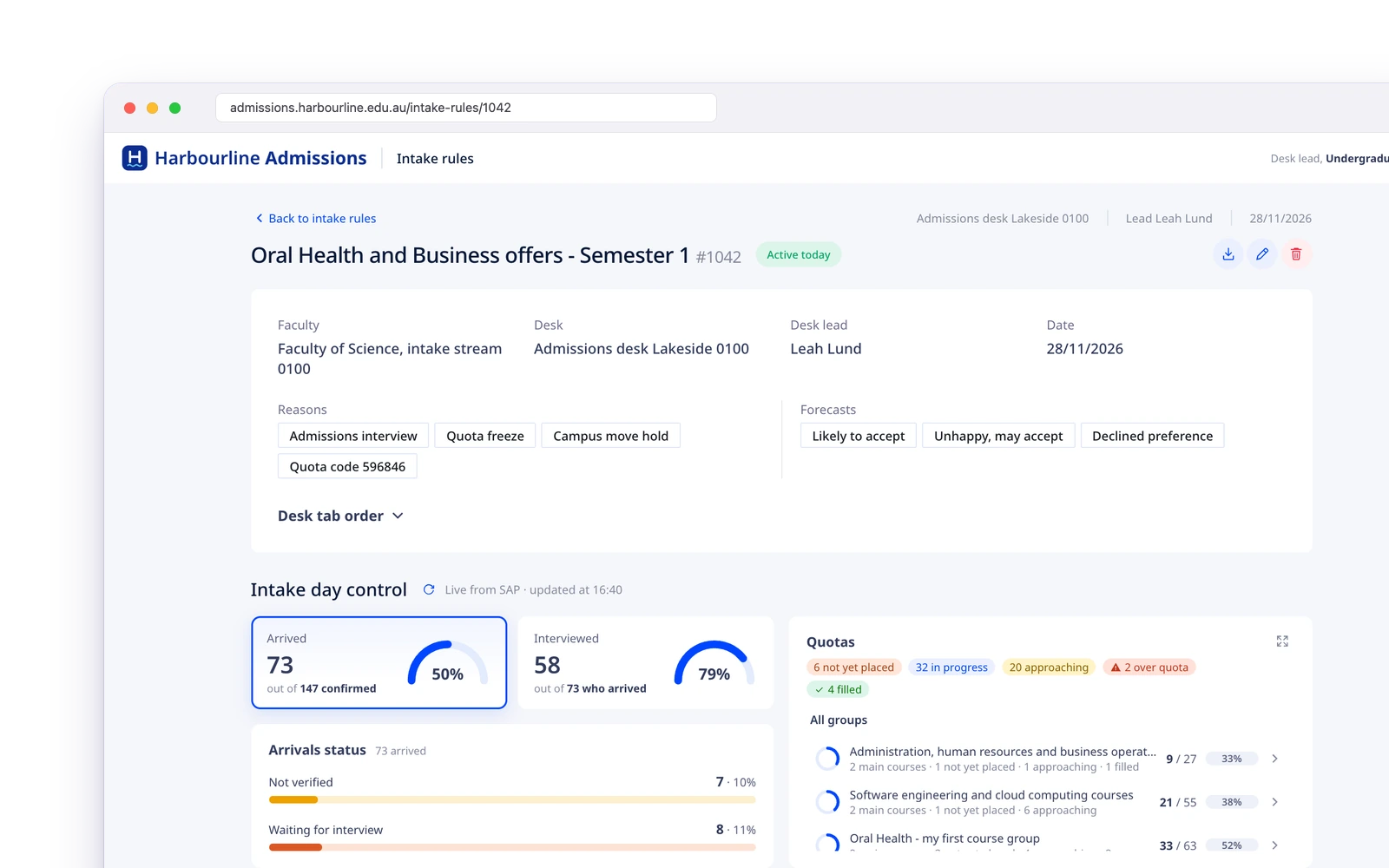
A saved intake rule marked Active today, with its settings at the top and the course groups, places and eligibility below.
Impact
Rules moved out of a document and into a system, which meant they could be changed mid-year - and the informal exception handling that had grown around the slow revision cycle lost its reason to exist.
Reading the rule back is the piece I would reuse anywhere complex rules are authored. Making the system restate the rule - condition by condition, then as a whole in the summary - catches the misunderstanding at the point of authoring, which is the only cheap place to catch it.
Preventing ambiguity rather than validating it was the better trade. Structured conditions are more constrained than free text, and users asked for that constraint once they had been burned by a clause read two ways.
Got something like this to untangle?
Start a project