Harbourline University · Admissions
An AI summary you can check in one click
A case file ran long, with many sections, and an officer needed one answer from it. The obvious move is to have AI summarise the file. The first version did exactly that, and it was worthless - because checking it meant reading the file anyway.
Overview
- Product
- Case record with an AI summary and a bounded assistant
- My role
- Product design, UI, AI interaction patterns, coded prototype
- Team
- Me as the product designer, with product management, back-end development and officers as reference users
- Tools
- Figma; coded prototype in Vue 3 and Vite
The problem
An officer answering one question - is this person eligible, and what is holding them up? - had to read a long file with many sections: education history, assessments, scholarships, medical notes, appointments, status. The answer was in there, but finding it meant reading the whole file, and two officers reading the same file could reach different conclusions.
That inconsistency was the part that mattered most. A slow answer is a cost; two different answers to the same question is a fairness problem, and it is the one the team was most exposed on.
The constraint that shaped everything: these officers are accountable for the decision. A tool that asks them to trust an output they cannot verify does not reduce their work, it just moves the risk onto them.
Users & personas
I don't need the system to decide. I need it to show me what I'd have found if I'd had an hour.
Alex Whitlam
Officer
- Goals
- Clear the day's queue of files
- Give every person the same answer another officer would give
- Leave a record of why a decision was made
- Frustrations
- Re-reading a long file to answer one question
- Being asked for a decision without the context behind it
- Tools that act before being asked
If I approve something, I own it. So I want to see what the officer saw.
Sophie Nguyen
Team Lead
- Goals
- Keep cases moving without becoming the bottleneck
- Spot a wrong call before it reaches the person it affects
- Report on where the queue is stuck
- Frustrations
- Approvals arriving with no trail
- Finding out late that a case had stalled
- Chasing officers for context over chat
Process
I sat with officers while they worked through real files and wrote down every question they asked out loud. Almost all of them were variants of the same few: what stage is this, what is missing, what have we promised, who last spoke to them, do they meet the rules, and what happens if I do nothing. That list became the brief - not "add AI to the record", but "answer these questions where the officer is already looking".
The first summary was a confident paragraph with no sources. The officers all said the same thing: they would have to open the file to check it, which meant the summary saved nothing. That was the most useful failure in the project, because it reframed the goal from summarising to evidencing.
So every claim in the summary now points at the section it came from, and the officer can go straight there. The summary is not asking to be believed; it is offering a shortcut to the evidence.
The assistant followed the same rule. It answers only from the record in front of it, quotes what it used, and says plainly when the record does not contain the answer - which is the response officers trusted most, because it is the one a guessing system never gives.
I also designed what the assistant must not do: no outside knowledge, no inference presented as fact, no action taken on the record. Writing the prohibitions down was as much a part of the design as the layout.
Key design decisions
A summary that shows its working
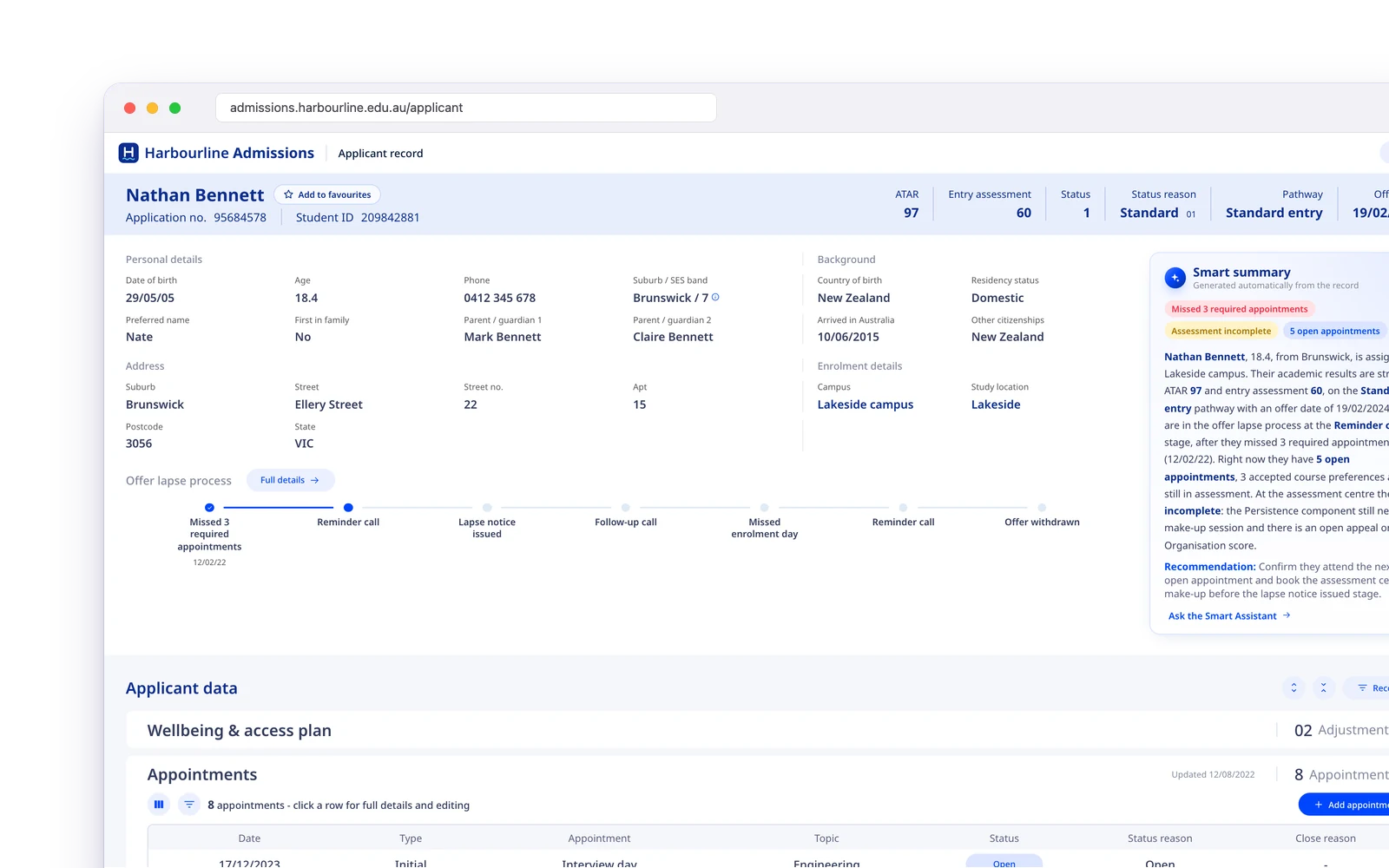
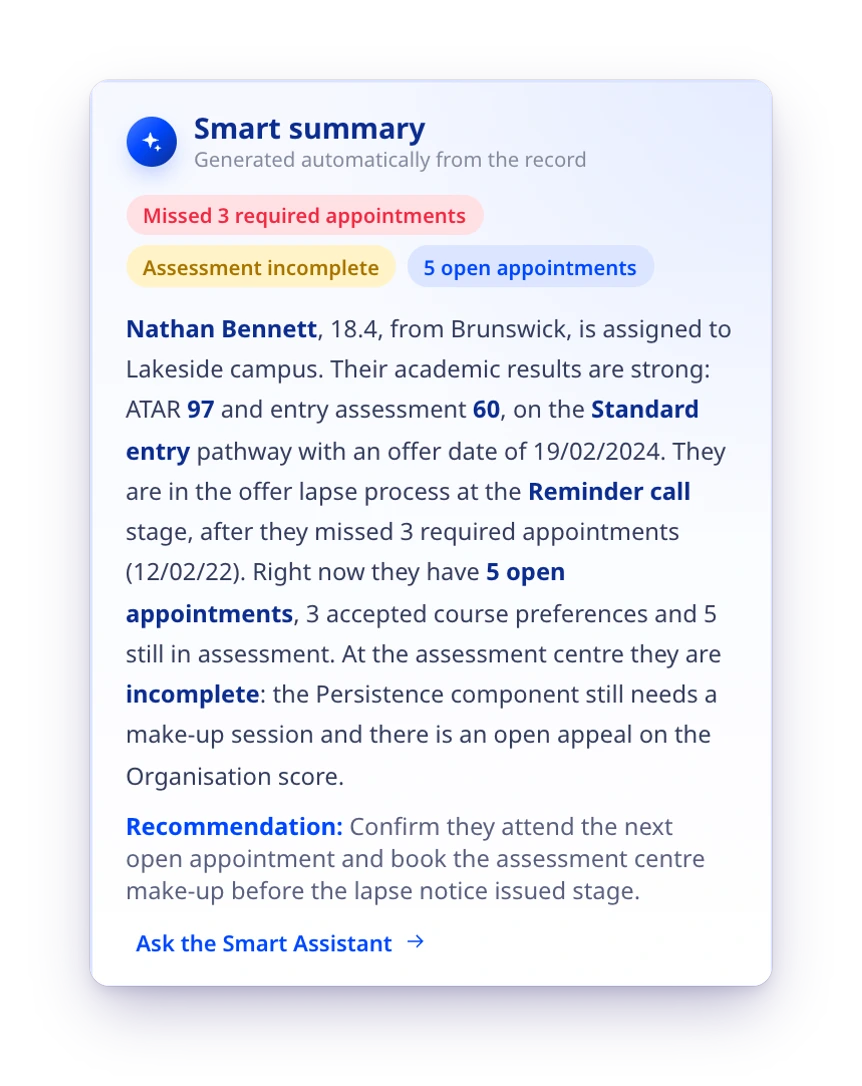
The record opens with a short AI summary of where things stand and what is blocking progress. Every statement links to the section it was drawn from, so checking it is one click rather than a re-read.
An assistant bounded by the file
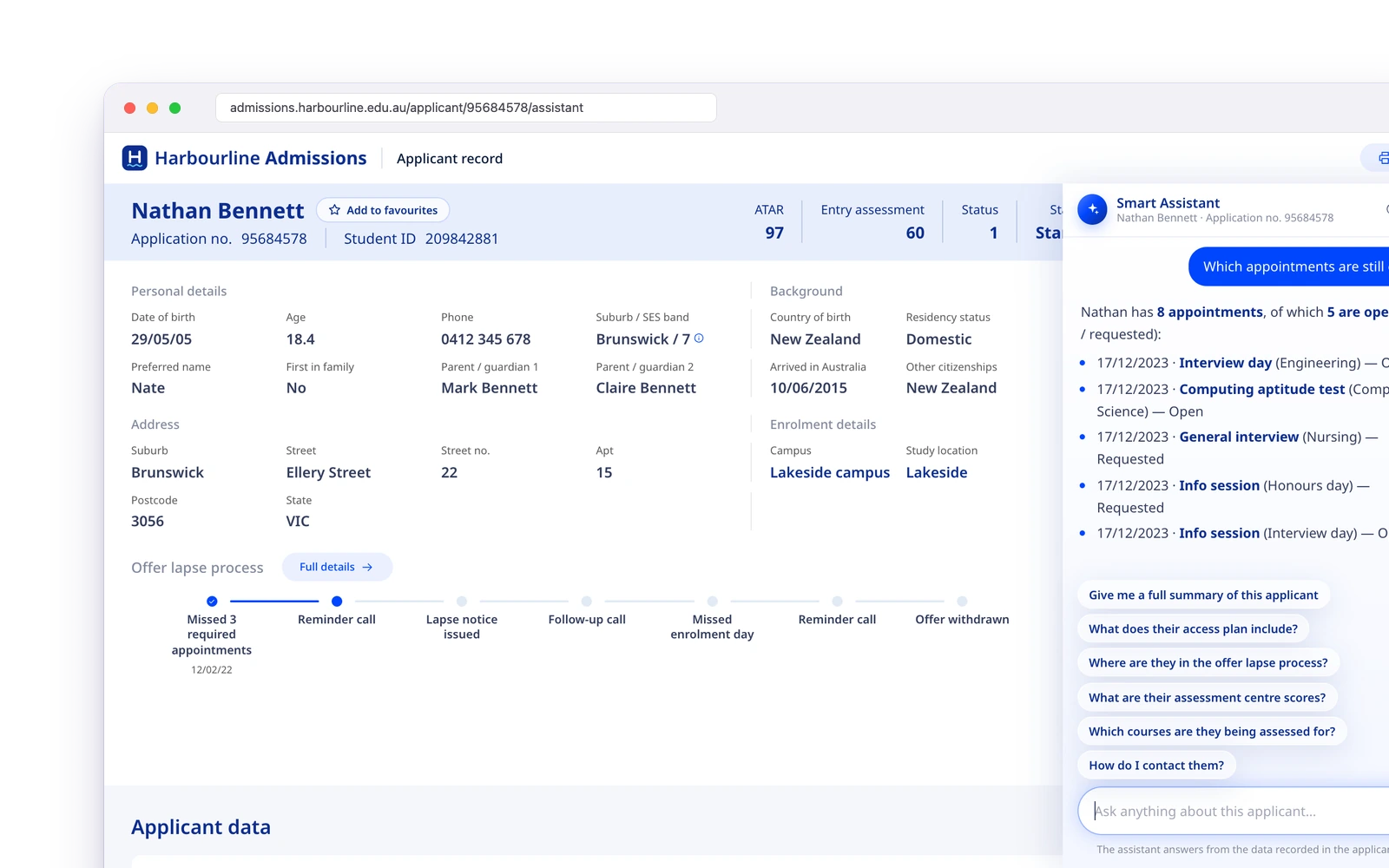
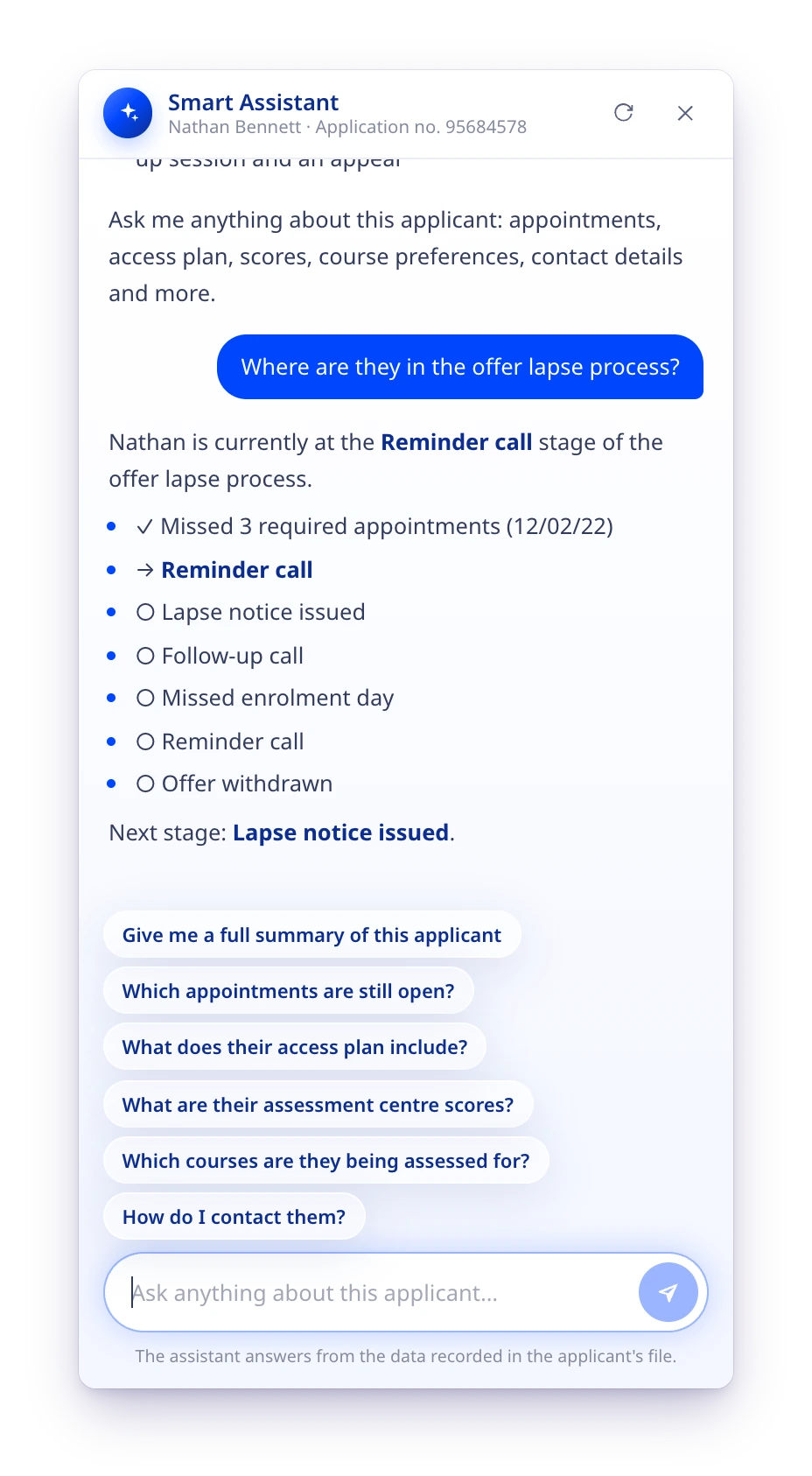
The assistant answers questions from the record only. It cites the sections it used and says when the record cannot answer - no outside knowledge, no inference presented as fact.
A long file, made scannable
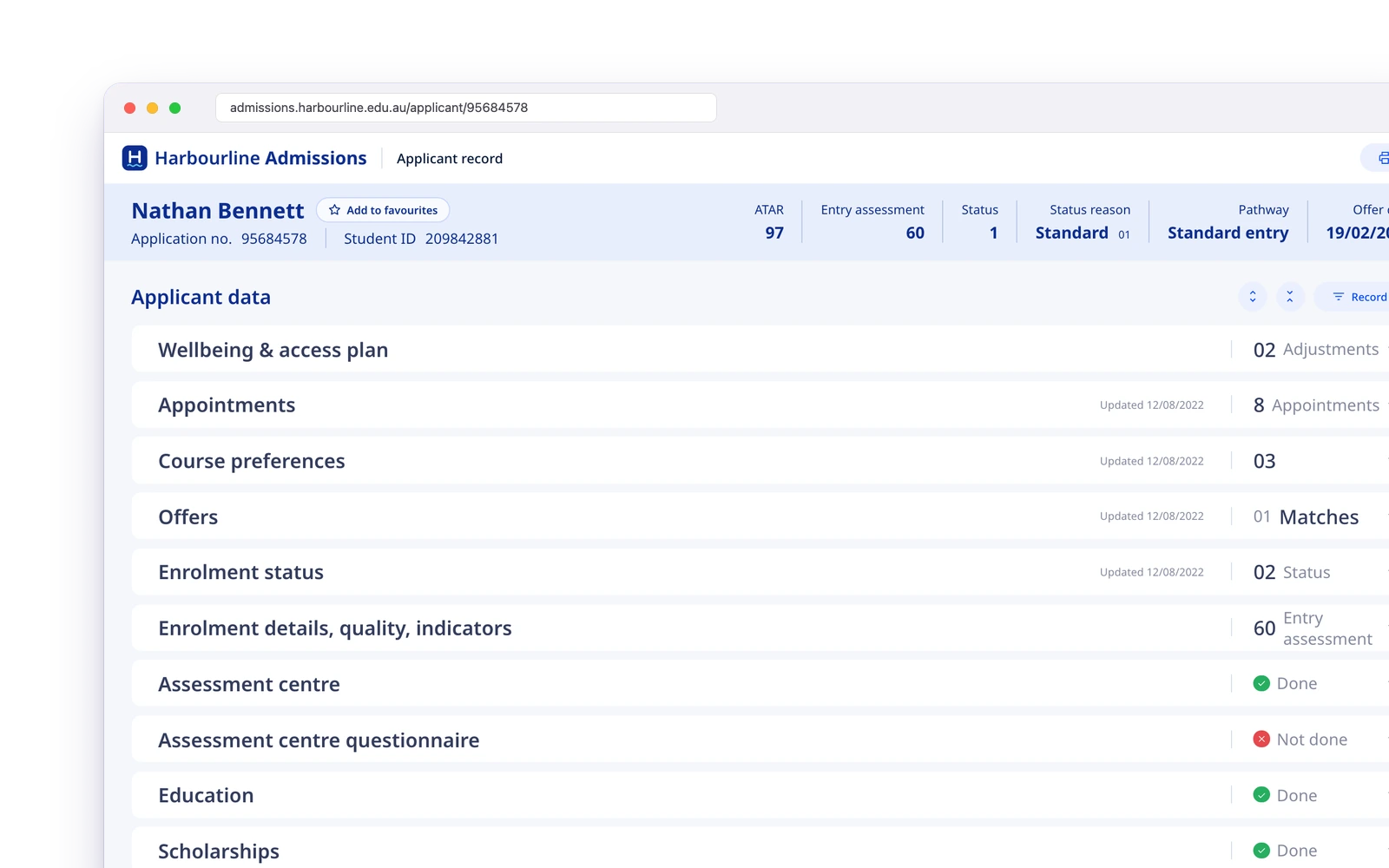
Education, assessments, scholarships, appointments, status and the rest collapse into labelled sections, so the full file is one scroll rather than a hunt.
Role-aware by design
A View as switch moves between Officer, Team Lead and Manager, which made the role differences easy to review with stakeholders.
Screens
 Open full size
The applicant record with the AI smart summary alongside it, each claim linking back to the section it came from, and, below it, the process for letting an offer lapse
 Open full size
The smart summary: flags for what is blocking progress, a short account of where the applicant stands, and a recommended next step, all drawn from the record.
 Open full size
The Smart Assistant open beside the record, answering which appointments are still open with dates, topics and statuses taken from the file.
 Open full size
The assistant placing the applicant in the offer lapse process stage by stage, with a reminder underneath that it answers only from the applicant's file.
 Open full size
The full file collapsed into labelled sections, each showing its count or status, so the whole record is one scroll rather than a hunt.
 Open full size
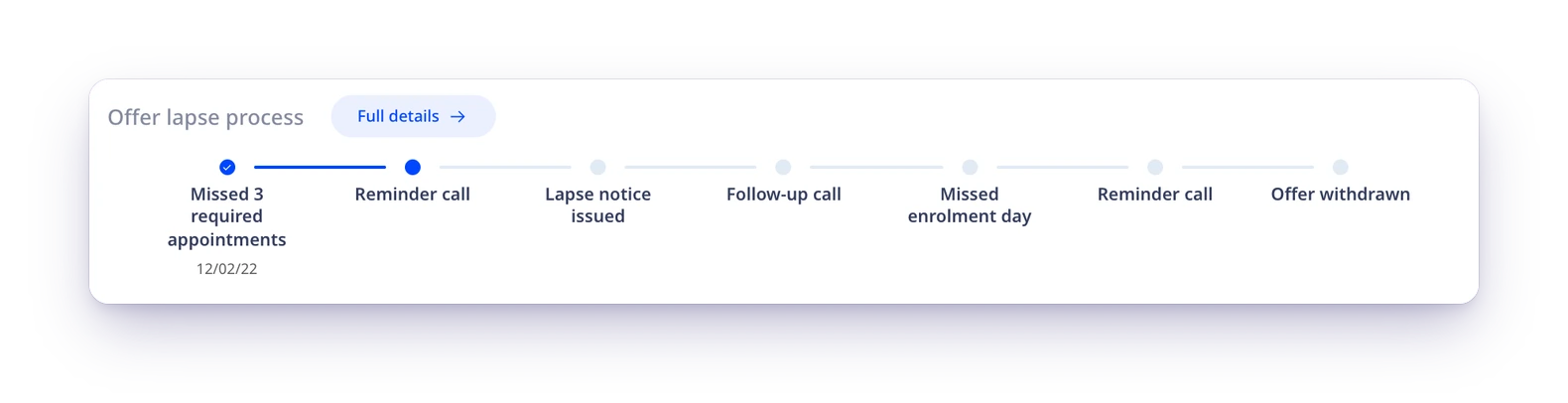
The offer lapse process as a timeline: two steps done, the applicant now at the reminder call, and every remaining step visible ahead.
Impact
The questions officers asked out loud are now answered on the screen they were already on, with a source for each.
More importantly, two officers reading the same summary reached the same conclusion. That consistency was what the team cared about most, and it came from the sourcing rather than from the summarising.
What I carry into every AI project since: the trust features were not a pass at the end. Sourcing every claim and bounding the assistant to the record were the decisions that made the thing usable at all. The first, unsourced version was faster to build and worth nothing.
Got something like this to untangle?
Start a project